Why you sign a message, what it says, and how to finish a pending wallet.
To put a wallet on a statement, you prove you control it. You do this by signing a short message with your wallet.
Signing a message cannot move funds. It is not a transaction. Nothing is broadcast to the Bitcoin network.
Why verify
Pending wallet
Verified wallet
Balance tracked
Yes
Yes
Shown on Home and Portfolio
Yes
Yes
Can go on a statement
No
Yes
Only want to track a wallet? You can leave it pending.
What you sign
The message looks like this:
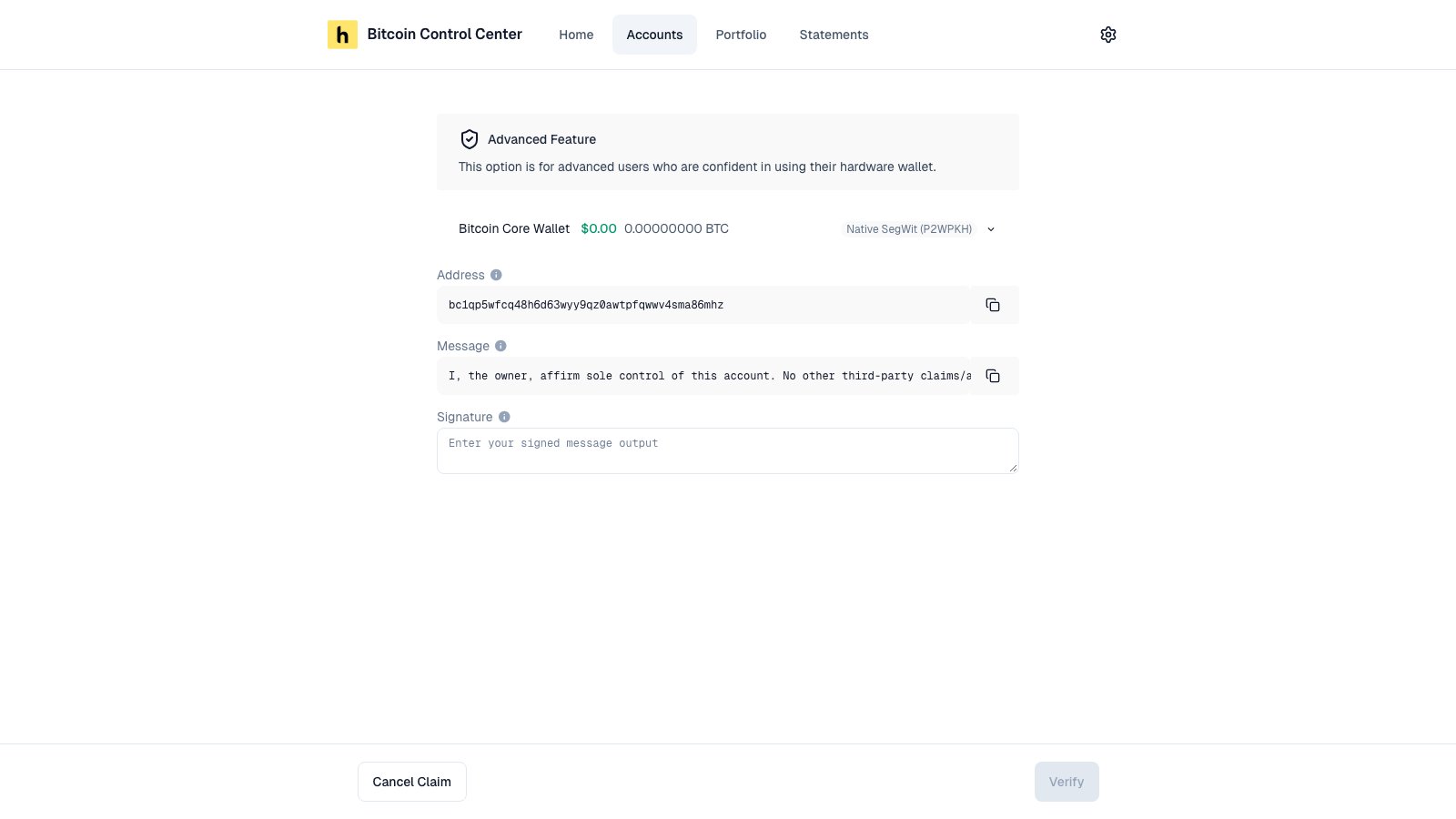
I, the owner, affirm sole control of this account. No other third-party claims/access permitted. Ownership revocable solely by me. ID=…
The ID is unique to your account. You sign with the wallet’s first receive address (path ending /0/0). For multisig, each key signs from its own Legacy (1…) address.
How to sign
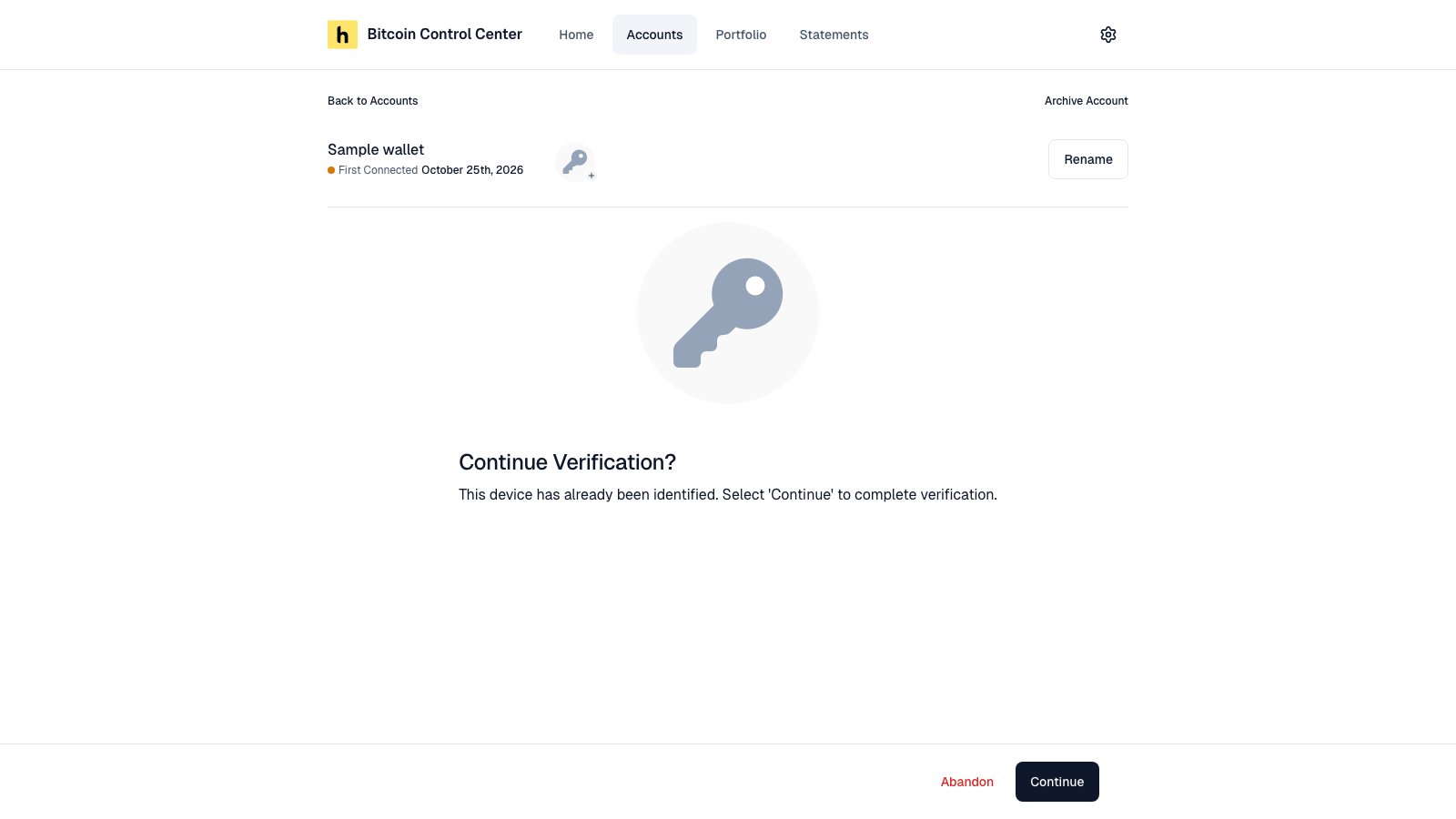
You sign right after adding a wallet. To finish later, open the pending account and select Continue.
A pending account. Select Continue to sign.
Ledger and Trezor
COLDCARD (MicroSD)
COLDCARD Q and Keystone
xpub or descriptor
Select Prove Control.
Check the message and address on your device. Approve it.
Select Download to save hoseki-ownership-claim.txt. Copy it to your MicroSD card. Do not edit it.
On the COLDCARD, go to Advanced/Tools → File Management → Sign Text File. On Mk2 or Mk3: Advanced → MicroSD Card → Sign Text File. Pick the file. Press Enter.
Upload the new hoseki-ownership-claim-signed.txt. Select Prove Control.
Scan the QR code on screen with your device.
Confirm and sign on the device.
Select Ready to Scan. Hold the signed QR up to your webcam.
When it works, you see your device’s name and Verified!, such as Trezor Verified! or Coldcard Verified!, with its balance. An unknown device shows Wallet Verified! Select Generate Statement, or View and the device’s name to open the account. If you started from a statement, the button says Complete Statement.
Good to know
Verification does not expire. You sign once per wallet.
The message says “the owner”. It does not include your name. Your name on statements comes from Settings.
Multisig needs a signature from enough keys to meet your quorum. See Multisig.
Stuck waiting for the device? After 20 seconds, a link appears to reset the step.
If signing fails
Message
Fix
Couldn’t verify this account (xpub or descriptor)
Sign the exact message with the exact address shown. Paste the signature unchanged, with no extra spaces or line breaks.
Invalid signature
Ledger or Trezor: sign with the same device, passphrase, and account you added. COLDCARD Q or Keystone: the signed QR couldn’t be read. Scan it again.
The signing process did not complete successfully.
COLDCARD (MicroSD): upload the file ending -signed.txt, not the original. QR devices: sign on the device and account you added.
File not downloaded or copied
Download or copy the message file before you select Next.
{"docsConfig":{"theme":"mint","$schema":"https://mintlify.com/docs.json","name":"Hoseki Help Center","description":"Help for Bitcoin Control Center and Hoseki Prove.","colors":{"primary":"#0F172A","light":"#CBD5E1","dark":"#334155"},"logo":{"light":"https://mintcdn.com/hoseki-corp/NyNucopK4mge4mHj/logo/hoseki-light.svg?fit=max\u0026auto=format\u0026n=NyNucopK4mge4mHj\u0026q=85\u0026s=8baded0723321c3cacaf703915da332a","dark":"https://mintcdn.com/hoseki-corp/NyNucopK4mge4mHj/logo/hoseki-dark.svg?fit=max\u0026auto=format\u0026n=NyNucopK4mge4mHj\u0026q=85\u0026s=2b53ee561286a5401b2b54e416b40050","href":"/"},"favicon":"https://mintcdn.com/hoseki-corp/NyNucopK4mge4mHj/favicon-hoseki.svg?fit=max\u0026auto=format\u0026n=NyNucopK4mge4mHj\u0026q=85\u0026s=650daaf99f25d0c8642b3971e44de59c","background":{"color":{"light":"#FFFFFF","dark":"#0F0F0F"}},"navbar":{"links":[{"href":"mailto:support@hoseki.app","label":"Support"},{"href":"https://prove.hoseki.app","label":"Web statements via Prove"}],"primary":{"type":"button","label":"Download Control Center","href":"https://www.bitcoincontrolcenter.com"}},"footer":{"socials":{"website":"https://www.hoseki.app","github":"https://github.com/hoseki-inc"}},"contextual":{"options":["copy","view","chatgpt","claude","perplexity","mcp","cursor","vscode"],"display":"header"},"styling":{"latex":false},"navigation":{"pages":[]}},"deployment":{"deploymentMetadataValue":{"subdomain":"hoseki-corp","hasAudioNarration":false,"actualSubdomain":"hoseki-corp","customDomains":["help.hoseki.app"],"gitSource":{"type":"github","owner":"hoseki-inc","repo":"docs","deployBranch":"main","contentDirectory":"","isPrivate":false,"mountPath":"","label":"","_id":"6ade460699006ddb7c82d1c6"},"entitlements":{"AI_CHAT":{"status":"DISABLED"},"WEB_MCP":{"status":"DISABLED"},"NARRATION":{"status":"DISABLED"}},"buildId":"6af25bc5dceb32eff51162c3","clientVersion":"0.0.4143","searchFilterCounts":[{"language":"default","tag":"Bitcoin Control Center","count":29},{"language":"default","tag":"Hoseki Prove","count":15},{"language":"default","tag":"Accounts","count":9},{"language":"default","tag":"Getting started","count":9},{"language":"default","tag":"Wallet guides","count":6},{"language":"default","tag":"Help","count":5},{"language":"default","tag":"Claims","count":5},{"language":"default","tag":"Home","count":4},{"language":"default","tag":"Settings and security","count":3},{"language":"default","tag":"Statements and requests","count":3}]},"assistantConfig":{"enableAskAiButton":false,"enableStarterQuestions":false,"enableContextualStarterQuestions":false,"enableAskAiSearchBar":true},"basePath":"","hasChatPermissions":false,"hasWebMcpPermissions":false,"toggles":[{"name":"kill-isr","enabled":true,"variant":{"name":"disabled","enabled":false,"feature_enabled":true},"impressionData":false},{"name":"custom-rbac-roles","enabled":true,"variant":{"name":"disabled","enabled":false,"feature_enabled":true},"impressionData":false},{"name":"agent-mintlify-slack","enabled":true,"variant":{"name":"disabled","enabled":false,"feature_enabled":true},"impressionData":false},{"name":"agent-integrations-settings","enabled":true,"variant":{"name":"disabled","enabled":false,"feature_enabled":true},"impressionData":false},{"name":"rbac-expansion","enabled":true,"variant":{"name":"disabled","enabled":false,"feature_enabled":true},"impressionData":false},{"name":"automations-pr-grouping","enabled":true,"variant":{"name":"disabled","enabled":false,"feature_enabled":true},"impressionData":false},{"name":"custom-prefix","enabled":true,"variant":{"name":"disabled","enabled":false,"feature_enabled":true},"impressionData":false},{"name":"analytics-v7","enabled":true,"variant":{"name":"disabled","enabled":false,"feature_enabled":true},"impressionData":false},{"name":"user-flows-analytics","enabled":true,"variant":{"name":"disabled","enabled":false,"feature_enabled":true},"impressionData":false},{"name":"no-publish-flow","enabled":true,"variant":{"name":"disabled","enabled":false,"feature_enabled":true},"impressionData":false},{"name":"workos-onboarding","enabled":true,"variant":{"name":"disabled","enabled":false,"feature_enabled":true},"impressionData":false},{"name":"snapshot-serving-live","enabled":true,"variant":{"name":"disabled","enabled":false,"feature_enabled":true},"impressionData":false},{"name":"stripTemperatureMiddleware","enabled":true,"variant":{"name":"disabled","enabled":false,"feature_enabled":true},"impressionData":false},{"name":"support-platform-pylon-zendesk","enabled":true,"variant":{"name":"disabled","enabled":false,"feature_enabled":true},"impressionData":false},{"name":"snapshot-serving","enabled":true,"variant":{"name":"disabled","enabled":false,"feature_enabled":true},"impressionData":false},{"name":"instant-rollback","enabled":true,"variant":{"name":"disabled","enabled":false,"feature_enabled":true},"impressionData":false},{"name":"granular-notifications-server","enabled":true,"variant":{"name":"disabled","enabled":false,"feature_enabled":true},"impressionData":false},{"name":"granular-notifications","enabled":true,"variant":{"name":"disabled","enabled":false,"feature_enabled":true},"impressionData":false},{"name":"automations-fable","enabled":true,"variant":{"name":"disabled","enabled":false,"feature_enabled":true},"impressionData":false},{"name":"fixed-ai-action-pricing","enabled":true,"variant":{"name":"disabled","enabled":false,"feature_enabled":true},"impressionData":false},{"name":"automation-resolve-merge-conflict","enabled":true,"variant":{"name":"disabled","enabled":false,"feature_enabled":true},"impressionData":false},{"name":"scoped-publishing","enabled":true,"variant":{"name":"disabled","enabled":false,"feature_enabled":true},"impressionData":false},{"name":"mintql","enabled":true,"variant":{"name":"disabled","enabled":false,"feature_enabled":true},"impressionData":false},{"name":"page-level-analytics","enabled":true,"variant":{"name":"disabled","enabled":false,"feature_enabled":true},"impressionData":false},{"name":"editor-version-history-v2","enabled":true,"variant":{"name":"disabled","enabled":false,"feature_enabled":true},"impressionData":false},{"name":"billing-page-v2","enabled":true,"variant":{"name":"disabled","enabled":false,"feature_enabled":true},"impressionData":false},{"name":"full-page-search","enabled":true,"variant":{"name":"disabled","enabled":false,"feature_enabled":true},"impressionData":false},{"name":"workspace-projects","enabled":true,"variant":{"name":"disabled","enabled":false,"feature_enabled":true},"impressionData":false},{"name":"assistant-v5","enabled":true,"variant":{"name":"disabled","enabled":false,"feature_enabled":true},"impressionData":false},{"name":"fork-pr-previews","enabled":true,"variant":{"name":"disabled","enabled":false,"feature_enabled":true},"impressionData":false},{"name":"revalidation-jwt","enabled":true,"variant":{"name":"disabled","enabled":false,"feature_enabled":true},"impressionData":false},{"name":"workos-sso-scim","enabled":true,"variant":{"name":"disabled","enabled":false,"feature_enabled":true},"impressionData":false},{"name":"hobby-abuse-scan","enabled":true,"variant":{"name":"disabled","enabled":false,"feature_enabled":true},"impressionData":false},{"name":"dashboard-inbox","enabled":true,"variant":{"name":"disabled","enabled":false,"feature_enabled":true},"impressionData":false},{"name":"workos-signup","enabled":true,"variant":{"name":"disabled","enabled":false,"feature_enabled":true},"impressionData":false},{"name":"turbopuffer-dual-write","enabled":true,"variant":{"name":"disabled","enabled":false,"feature_enabled":true},"impressionData":false},{"name":"workos-enabled","enabled":true,"variant":{"name":"disabled","enabled":false,"feature_enabled":true},"impressionData":false},{"name":"approve-review-flow","enabled":true,"variant":{"name":"disabled","enabled":false,"feature_enabled":true},"impressionData":false},{"name":"editor-metadata","enabled":true,"variant":{"name":"disabled","enabled":false,"feature_enabled":true},"impressionData":false},{"name":"sso-setup-deadline-banner","enabled":true,"variant":{"name":"disabled","enabled":false,"feature_enabled":true},"impressionData":false},{"name":"turbopuffer-serve","enabled":true,"variant":{"name":"disabled","enabled":false,"feature_enabled":true},"impressionData":false},{"name":"live-agents","enabled":true,"variant":{"name":"disabled","enabled":false,"feature_enabled":true},"impressionData":false},{"name":"llms-txt-v2","enabled":true,"variant":{"name":"disabled","enabled":false,"feature_enabled":true},"impressionData":false}],"googleFontsInlined":false},"customCss":[],"page":{"pagePath":"bitcoin-control-center/accounts/verify-ownership","slug":"/bitcoin-control-center/accounts/verify-ownership","pageMetadata":{"title":"Verify ownership (prove control)","sidebarTitle":"Verify ownership","description":"Why you sign a message, what it says, and how to finish a pending wallet.","keywords":["verify","prove control","proof of control","sign message","pending","verified","signature","claim verified"],"href":"/bitcoin-control-center/accounts/verify-ownership"},"description":{"compiledSource":"\"use strict\";\nconst {jsx: _jsx} = arguments[0];\nconst {useMDXComponents: _provideComponents} = arguments[0];\nfunction _createMdxContent(props) {\n const _components = {\n p: \"p\",\n ..._provideComponents(),\n ...props.components\n };\n return _jsx(_components.p, {\n children: \"Why you sign a message, what it says, and how to finish a pending wallet.\"\n });\n}\nfunction MDXContent(props = {}) {\n const {wrapper: MDXLayout} = {\n ..._provideComponents(),\n ...props.components\n };\n return MDXLayout ? _jsx(MDXLayout, {\n ...props,\n children: _jsx(_createMdxContent, {\n ...props\n })\n }) : _createMdxContent(props);\n}\nreturn {\n default: MDXContent\n};\n","frontmatter":{},"scope":{}},"pageType":"default","mdx":{"mdxSource":{"compiledSource":"\"use strict\";const{Fragment:_Fragment,jsx:_jsx,jsxs:_jsxs}=arguments[0];const{useMDXComponents:_provideComponents}=arguments[0];function _createMdxContent(props){const _components={a:`a`,code:`code`,li:`li`,ol:`ol`,p:`p`,pre:`pre`,span:`span`,strong:`strong`,tbody:`tbody`,td:`td`,th:`th`,thead:`thead`,tr:`tr`,ul:`ul`,..._provideComponents(),...props.components},{CodeBlock,Frame,Heading,Info,OptimizedImage,Tab,Table,Tabs}=_components;if(!CodeBlock)_missingMdxReference(`CodeBlock`,true);if(!Frame)_missingMdxReference(`Frame`,true);if(!Heading)_missingMdxReference(`Heading`,true);if(!Info)_missingMdxReference(`Info`,true);if(!OptimizedImage)_missingMdxReference(`OptimizedImage`,true);if(!Tab)_missingMdxReference(`Tab`,true);if(!Table)_missingMdxReference(`Table`,true);if(!Tabs)_missingMdxReference(`Tabs`,true);return _jsxs(_Fragment,{children:[_jsxs(_components.p,{children:[`To put a wallet on a `,_jsx(_components.a,{href:`/bitcoin-control-center/statements/statements-and-hoseki-verified`,children:`statement`}),`, you prove you control it. You do this by signing a short message with your wallet.`]}),`\n`,_jsxs(Info,{children:[`Signing a message `,_jsx(_components.strong,{children:`cannot move funds`}),`. It is not a transaction. Nothing is broadcast to the Bitcoin network.`]}),`\n`,_jsx(Heading,{level:`2`,id:`why-verify`,children:`Why verify`}),`\n`,_jsxs(Table,{children:[_jsx(_components.thead,{children:_jsxs(_components.tr,{children:[_jsx(_components.th,{}),_jsx(_components.th,{children:`Pending wallet`}),_jsx(_components.th,{children:`Verified wallet`})]})}),_jsxs(_components.tbody,{children:[_jsxs(_components.tr,{children:[_jsx(_components.td,{children:`Balance tracked`}),_jsx(_components.td,{children:`Yes`}),_jsx(_components.td,{children:`Yes`})]}),_jsxs(_components.tr,{children:[_jsx(_components.td,{children:`Shown on Home and Portfolio`}),_jsx(_components.td,{children:`Yes`}),_jsx(_components.td,{children:`Yes`})]}),_jsxs(_components.tr,{children:[_jsx(_components.td,{children:`Can go on a statement`}),_jsx(_components.td,{children:`No`}),_jsx(_components.td,{children:`Yes`})]})]})]}),`\n`,_jsx(_components.p,{children:`Only want to track a wallet? You can leave it pending.`}),`\n`,_jsx(Heading,{level:`2`,id:`what-you-sign`,children:`What you sign`}),`\n`,_jsx(_components.p,{children:`The message looks like this:`}),`\n`,_jsx(CodeBlock,{filename:``,numberOfLines:`2`,language:`text`,children:_jsx(_components.pre,{className:`shiki shiki-themes github-light-default dark-plus`,style:{backgroundColor:`#ffffff`,\"--shiki-dark-bg\":`#0B0C0E`,color:`#1f2328`,\"--shiki-dark\":`#D4D4D4`},language:`text`,children:_jsxs(_components.code,{language:`text`,numberOfLines:`2`,children:[_jsx(_components.span,{className:`line`,children:_jsx(_components.span,{children:`I, the owner, affirm sole control of this account. No other third-party claims/access permitted. Ownership revocable solely by me. ID=…`})}),`\n`,_jsx(_components.span,{className:`line`,children:_jsx(_components.span,{})})]})})}),`\n`,_jsxs(_components.p,{children:[`The `,_jsx(_components.code,{children:`ID`}),` is unique to your account. You sign with the wallet’s `,_jsx(_components.strong,{children:`first receive address`}),` (path ending `,_jsx(_components.code,{children:`/0/0`}),`). For multisig, each key signs from its own Legacy (`,_jsx(_components.code,{children:`1…`}),`) address.`]}),`\n`,_jsx(Heading,{level:`2`,id:`how-to-sign`,children:`How to sign`}),`\n`,_jsxs(_components.p,{children:[`You sign right after adding a wallet. To finish later, open the `,_jsx(_components.strong,{children:`pending`}),` account and select `,_jsx(_components.strong,{children:`Continue`}),`.`]}),`\n`,_jsx(Frame,{caption:`A pending account. Select Continue to sign.`,children:_jsx(OptimizedImage,{src:`https://mintcdn.com/hoseki-corp/UfUbkRUza9CJFqpH/images/accounts-pending-continue.png?fit=max\u0026auto=format\u0026n=UfUbkRUza9CJFqpH\u0026q=85\u0026s=935b7bd8d54ea9427613db416df92921`,alt:`Pending account page titled Continue Verification? with Abandon and Continue buttons`,\"data-og-width\":`1600`,width:`1600`,\"data-og-height\":`900`,height:`900`,\"data-path\":`images/accounts-pending-continue.png`,\"data-optimize\":`true`,\"data-opv\":`3`,srcset:`https://mintcdn.com/hoseki-corp/UfUbkRUza9CJFqpH/images/accounts-pending-continue.png?w=280\u0026fit=max\u0026auto=format\u0026n=UfUbkRUza9CJFqpH\u0026q=85\u0026s=f7692df12460fd45c6a1c8d94fe93151 280w, https://mintcdn.com/hoseki-corp/UfUbkRUza9CJFqpH/images/accounts-pending-continue.png?w=560\u0026fit=max\u0026auto=format\u0026n=UfUbkRUza9CJFqpH\u0026q=85\u0026s=cfeffb6994aac82287e731a8d53acbc2 560w, https://mintcdn.com/hoseki-corp/UfUbkRUza9CJFqpH/images/accounts-pending-continue.png?w=840\u0026fit=max\u0026auto=format\u0026n=UfUbkRUza9CJFqpH\u0026q=85\u0026s=70ebe74ff8c1bbd71117ce1a7fa1c43c 840w, https://mintcdn.com/hoseki-corp/UfUbkRUza9CJFqpH/images/accounts-pending-continue.png?w=1100\u0026fit=max\u0026auto=format\u0026n=UfUbkRUza9CJFqpH\u0026q=85\u0026s=13ce99c93cf7e326aa091de6ff902f47 1100w, https://mintcdn.com/hoseki-corp/UfUbkRUza9CJFqpH/images/accounts-pending-continue.png?w=1650\u0026fit=max\u0026auto=format\u0026n=UfUbkRUza9CJFqpH\u0026q=85\u0026s=b7bba8496f19b4bb740cc394bffbfb84 1650w, https://mintcdn.com/hoseki-corp/UfUbkRUza9CJFqpH/images/accounts-pending-continue.png?w=2500\u0026fit=max\u0026auto=format\u0026n=UfUbkRUza9CJFqpH\u0026q=85\u0026s=b6b44e927e0b970b57180cb5ac33be76 2500w`})}),`\n`,_jsxs(Tabs,{children:[_jsx(Tab,{title:`Ledger and Trezor`,id:`ledger-and-trezor`,children:_jsxs(_components.ol,{children:[`\n`,_jsxs(_components.li,{children:[`Select `,_jsx(_components.strong,{children:`Prove Control`}),`.`]}),`\n`,_jsx(_components.li,{children:`Check the message and address on your device. Approve it.`}),`\n`]})}),_jsx(Tab,{title:`COLDCARD (MicroSD)`,id:`coldcard-microsd`,children:_jsxs(_components.ol,{children:[`\n`,_jsxs(_components.li,{children:[`Select `,_jsx(_components.strong,{children:`Download`}),` to save `,_jsx(_components.code,{children:`hoseki-ownership-claim.txt`}),`. Copy it to your MicroSD card. Do not edit it.`]}),`\n`,_jsxs(_components.li,{children:[`On the COLDCARD, go to `,_jsx(_components.strong,{children:`Advanced/Tools`}),` → `,_jsx(_components.strong,{children:`File Management`}),` → `,_jsx(_components.strong,{children:`Sign Text File`}),`. On Mk2 or Mk3: `,_jsx(_components.strong,{children:`Advanced`}),` → `,_jsx(_components.strong,{children:`MicroSD Card`}),` → `,_jsx(_components.strong,{children:`Sign Text File`}),`. Pick the file. Press Enter.`]}),`\n`,_jsxs(_components.li,{children:[`Upload the new `,_jsx(_components.code,{children:`hoseki-ownership-claim-signed.txt`}),`. Select `,_jsx(_components.strong,{children:`Prove Control`}),`.`]}),`\n`]})}),_jsx(Tab,{title:`COLDCARD Q and Keystone`,id:`coldcard-q-and-keystone`,children:_jsxs(_components.ol,{children:[`\n`,_jsx(_components.li,{children:`Scan the QR code on screen with your device.`}),`\n`,_jsx(_components.li,{children:`Confirm and sign on the device.`}),`\n`,_jsxs(_components.li,{children:[`Select `,_jsx(_components.strong,{children:`Ready to Scan`}),`. Hold the signed QR up to your webcam.`]}),`\n`]})}),_jsxs(Tab,{title:`xpub or descriptor`,id:`xpub-or-descriptor`,children:[_jsxs(_components.ol,{children:[`\n`,_jsxs(_components.li,{children:[`Copy the `,_jsx(_components.strong,{children:`Address`}),` and `,_jsx(_components.strong,{children:`Message`}),`.`]}),`\n`,_jsxs(_components.li,{children:[`Sign it in your wallet software. See `,_jsx(_components.a,{href:`/bitcoin-control-center/wallet-guides/sign-message`,children:`Sign a message in your wallet`}),`.`]}),`\n`,_jsxs(_components.li,{children:[`Paste the signature. Select `,_jsx(_components.strong,{children:`Verify`}),`.`]}),`\n`]}),_jsx(Frame,{caption:`Sign with any wallet tool and paste the result.`,children:_jsx(OptimizedImage,{src:`https://mintcdn.com/hoseki-corp/UfUbkRUza9CJFqpH/images/accounts-xpub-signing.png?fit=max\u0026auto=format\u0026n=UfUbkRUza9CJFqpH\u0026q=85\u0026s=6b1426e7c847f82bfad4fa432e4153aa`,alt:`Manual signing screen with Address, Message, and Signature fields`,\"data-og-width\":`1600`,width:`1600`,\"data-og-height\":`900`,height:`900`,\"data-path\":`images/accounts-xpub-signing.png`,\"data-optimize\":`true`,\"data-opv\":`3`,srcset:`https://mintcdn.com/hoseki-corp/UfUbkRUza9CJFqpH/images/accounts-xpub-signing.png?w=280\u0026fit=max\u0026auto=format\u0026n=UfUbkRUza9CJFqpH\u0026q=85\u0026s=f68eeba3635a443ff53f22f2f2075e97 280w, https://mintcdn.com/hoseki-corp/UfUbkRUza9CJFqpH/images/accounts-xpub-signing.png?w=560\u0026fit=max\u0026auto=format\u0026n=UfUbkRUza9CJFqpH\u0026q=85\u0026s=6acd9c38a473b2999df209a650412032 560w, https://mintcdn.com/hoseki-corp/UfUbkRUza9CJFqpH/images/accounts-xpub-signing.png?w=840\u0026fit=max\u0026auto=format\u0026n=UfUbkRUza9CJFqpH\u0026q=85\u0026s=a062363bb43444c4ddd62b3cbdf07f1e 840w, https://mintcdn.com/hoseki-corp/UfUbkRUza9CJFqpH/images/accounts-xpub-signing.png?w=1100\u0026fit=max\u0026auto=format\u0026n=UfUbkRUza9CJFqpH\u0026q=85\u0026s=b075cae436cb74cb07e55f2664167e77 1100w, https://mintcdn.com/hoseki-corp/UfUbkRUza9CJFqpH/images/accounts-xpub-signing.png?w=1650\u0026fit=max\u0026auto=format\u0026n=UfUbkRUza9CJFqpH\u0026q=85\u0026s=5ac3c71710a598790b9884a36f262e43 1650w, https://mintcdn.com/hoseki-corp/UfUbkRUza9CJFqpH/images/accounts-xpub-signing.png?w=2500\u0026fit=max\u0026auto=format\u0026n=UfUbkRUza9CJFqpH\u0026q=85\u0026s=396c8d14e5bd4baadde25316c2609f28 2500w`})})]})]}),`\n`,_jsxs(_components.p,{children:[`When it works, you see your device’s name and `,_jsx(_components.strong,{children:`Verified!`}),`, such as `,_jsx(_components.strong,{children:`Trezor Verified!`}),` or `,_jsx(_components.strong,{children:`Coldcard Verified!`}),`, with its balance. An unknown device shows `,_jsx(_components.strong,{children:`Wallet Verified!`}),` Select `,_jsx(_components.strong,{children:`Generate Statement`}),`, or `,_jsx(_components.strong,{children:`View`}),` and the device’s name to open the account. If you started from a statement, the button says `,_jsx(_components.strong,{children:`Complete Statement`}),`.`]}),`\n`,_jsx(Heading,{level:`2`,id:`good-to-know`,children:`Good to know`}),`\n`,_jsxs(_components.ul,{children:[`\n`,_jsxs(_components.li,{children:[_jsx(_components.strong,{children:`Verification does not expire.`}),` You sign once per wallet.`]}),`\n`,_jsxs(_components.li,{children:[_jsx(_components.strong,{children:`The message says “the owner”.`}),` It does not include your name. Your name on statements comes from `,_jsx(_components.a,{href:`/bitcoin-control-center/settings/app-settings`,children:`Settings`}),`.`]}),`\n`,_jsxs(_components.li,{children:[_jsx(_components.strong,{children:`Multisig`}),` needs a signature from enough keys to meet your quorum. See `,_jsx(_components.a,{href:`/bitcoin-control-center/accounts/multisig`,children:`Multisig`}),`.`]}),`\n`,_jsxs(_components.li,{children:[_jsx(_components.strong,{children:`Stuck waiting for the device?`}),` After 20 seconds, a link appears to reset the step.`]}),`\n`]}),`\n`,_jsx(Heading,{level:`2`,id:`if-signing-fails`,children:`If signing fails`}),`\n`,_jsxs(Table,{children:[_jsx(_components.thead,{children:_jsxs(_components.tr,{children:[_jsx(_components.th,{children:`Message`}),_jsx(_components.th,{children:`Fix`})]})}),_jsxs(_components.tbody,{children:[_jsxs(_components.tr,{children:[_jsxs(_components.td,{children:[_jsx(_components.strong,{children:`Couldn’t verify this account`}),` (xpub or descriptor)`]}),_jsx(_components.td,{children:`Sign the exact message with the exact address shown. Paste the signature unchanged, with no extra spaces or line breaks.`})]}),_jsxs(_components.tr,{children:[_jsx(_components.td,{children:_jsx(_components.strong,{children:`Invalid signature`})}),_jsx(_components.td,{children:`Ledger or Trezor: sign with the same device, passphrase, and account you added. COLDCARD Q or Keystone: the signed QR couldn’t be read. Scan it again.`})]}),_jsxs(_components.tr,{children:[_jsx(_components.td,{children:_jsx(_components.strong,{children:`The signing process did not complete successfully.`})}),_jsxs(_components.td,{children:[`COLDCARD (MicroSD): upload the file ending `,_jsx(_components.code,{children:`-signed.txt`}),`, not the original. QR devices: sign on the device and account you added.`]})]}),_jsxs(_components.tr,{children:[_jsx(_components.td,{children:_jsx(_components.strong,{children:`File not downloaded or copied`})}),_jsxs(_components.td,{children:[`Download or copy the message file before you select `,_jsx(_components.strong,{children:`Next`}),`.`]})]})]})]})]})}function MDXContent(props={}){const{wrapper:MDXLayout}={..._provideComponents(),...props.components};return MDXLayout?_jsx(MDXLayout,{...props,children:_jsx(_createMdxContent,{...props})}):_createMdxContent(props)}return{default:MDXContent};function _missingMdxReference(id,component){throw new Error(`Expected `+(component?`component`:`object`)+\" `\"+id+\"` to be defined: you likely forgot to import, pass, or provide it.\")}","frontmatter":{},"scope":{"config":{},"pageMetadata":{"title":"Verify ownership (prove control)","sidebarTitle":"Verify ownership","description":"Why you sign a message, what it says, and how to finish a pending wallet.","keywords":["verify","prove control","proof of control","sign message","pending","verified","signature","claim verified"],"href":"/bitcoin-control-center/accounts/verify-ownership"}}},"mdxSourceWithNoJs":null},"mdxExtracts":{"tableOfContents":[{"title":"Why verify","slug":"why-verify","depth":2,"children":[]},{"title":"What you sign","slug":"what-you-sign","depth":2,"children":[]},{"title":"How to sign","slug":"how-to-sign","depth":2,"children":[]},{"title":"Good to know","slug":"good-to-know","depth":2,"children":[]},{"title":"If signing fails","slug":"if-signing-fails","depth":2,"children":[]}],"codeExamples":{}},"jsLinks":[],"subdomain":"hoseki-corp","siteName":"Hoseki Help Center","title":"Verify ownership (prove control) - Hoseki Help Center","navMaps":{"firstHrefInVersion":{},"firstHrefInLanguage":{}},"lastModified":"2026-11-09T23:48:25.610Z","originalFileLocation":"bitcoin-control-center/accounts/verify-ownership.mdx"},"headHtml":"\u003cscript data-mint-head>(function(){var d=document.documentElement,p=null;if(!p){try{p=localStorage.getItem(\"isDarkMode\")}catch(e){}if(p==='true')p='dark';else if(p==='false')p='light';if(p!=='light'\u0026\u0026p!=='dark'\u0026\u0026p!=='system')p=\"system\"}var r=p==='system'?(matchMedia(\"(prefers-color-scheme: dark)\").matches?'dark':'light'):p;d.classList.remove(r==='dark'?'light':'dark');d.classList.add(r);d.setAttribute(\"data-theme-preference\",p)})();\u003c/script>\u003cmeta data-mint-head name=\"description\" content=\"Why you sign a message, what it says, and how to finish a pending wallet.\">\u003cmeta data-mint-head name=\"application-name\" content=\"Hoseki Help Center\">\u003cmeta data-mint-head name=\"generator\" content=\"Mintlify\">\u003clink data-mint-head rel=\"icon\" type=\"image/png\" sizes=\"192x192\" href=\"/mintlify-assets/_mintlify/favicons/hoseki-corp/9VZW80yxl3R3RsoK/_generated/favicon/android-chrome-192x192.png\" media=\"(prefers-color-scheme: light)\">\u003clink data-mint-head rel=\"apple-touch-icon\" type=\"image/png\" sizes=\"180x180\" href=\"/mintlify-assets/_mintlify/favicons/hoseki-corp/9VZW80yxl3R3RsoK/_generated/favicon/apple-touch-icon.png\">\u003clink data-mint-head rel=\"icon\" type=\"image/png\" sizes=\"16x16\" href=\"/mintlify-assets/_mintlify/favicons/hoseki-corp/9VZW80yxl3R3RsoK/_generated/favicon/favicon-16x16.png\" media=\"(prefers-color-scheme: light)\">\u003clink data-mint-head rel=\"icon\" type=\"image/png\" sizes=\"32x32\" href=\"/mintlify-assets/_mintlify/favicons/hoseki-corp/9VZW80yxl3R3RsoK/_generated/favicon/favicon-32x32.png\" media=\"(prefers-color-scheme: light)\">\u003clink data-mint-head rel=\"shortcut icon\" type=\"image/x-icon\" href=\"/mintlify-assets/_mintlify/favicons/hoseki-corp/9VZW80yxl3R3RsoK/_generated/favicon/favicon.ico\" media=\"(prefers-color-scheme: light)\">\u003clink data-mint-head rel=\"icon\" type=\"image/png\" sizes=\"192x192\" href=\"/mintlify-assets/_mintlify/favicons/hoseki-corp/9VZW80yxl3R3RsoK/_generated/favicon-dark/android-chrome-192x192.png\" media=\"(prefers-color-scheme: dark)\">\u003clink data-mint-head rel=\"icon\" type=\"image/png\" sizes=\"16x16\" href=\"/mintlify-assets/_mintlify/favicons/hoseki-corp/9VZW80yxl3R3RsoK/_generated/favicon-dark/favicon-16x16.png\" media=\"(prefers-color-scheme: dark)\">\u003clink data-mint-head rel=\"icon\" type=\"image/png\" sizes=\"32x32\" href=\"/mintlify-assets/_mintlify/favicons/hoseki-corp/9VZW80yxl3R3RsoK/_generated/favicon-dark/favicon-32x32.png\" media=\"(prefers-color-scheme: dark)\">\u003clink data-mint-head rel=\"shortcut icon\" type=\"image/x-icon\" href=\"/mintlify-assets/_mintlify/favicons/hoseki-corp/9VZW80yxl3R3RsoK/_generated/favicon-dark/favicon.ico\" media=\"(prefers-color-scheme: dark)\">\u003cmeta data-mint-head property=\"og:title\" content=\"Verify ownership (prove control) - Hoseki Help Center\">\u003cmeta data-mint-head property=\"og:description\" content=\"Why you sign a message, what it says, and how to finish a pending wallet.\">\u003cmeta data-mint-head property=\"og:site_name\" content=\"Hoseki Help Center\">\u003cmeta data-mint-head property=\"og:url\" content=\"https://help.hoseki.app/bitcoin-control-center/accounts/verify-ownership\">\u003cmeta data-mint-head property=\"og:type\" content=\"website\">\u003cmeta data-mint-head property=\"og:image\" content=\"https://hoseki-corp.mintlify.site/_mintlify/api/og/v2?division=Accounts\u0026amp;title=Verify+ownership+%28prove+control%29\u0026amp;description=Why+you+sign+a+message%2C+what+it+says%2C+and+how+to+finish+a+pending+wallet.\u0026amp;theme=482b27a28fc6a302315c9f4c\u0026amp;signature=55092e4a4d645d5ba10cdb0e89e095bca9b9c6af51035cfa54d45a4f4352444f\">\u003cmeta data-mint-head property=\"og:image:width\" content=\"1200\">\u003cmeta data-mint-head property=\"og:image:height\" content=\"630\">\u003cmeta data-mint-head name=\"twitter:card\" content=\"summary_large_image\">\u003cmeta data-mint-head name=\"twitter:title\" content=\"Verify ownership (prove control) - Hoseki Help Center\">\u003cmeta data-mint-head name=\"twitter:description\" content=\"Why you sign a message, what it says, and how to finish a pending wallet.\">\u003cmeta data-mint-head name=\"twitter:image\" content=\"https://hoseki-corp.mintlify.site/_mintlify/api/og/v2?division=Accounts\u0026amp;title=Verify+ownership+%28prove+control%29\u0026amp;description=Why+you+sign+a+message%2C+what+it+says%2C+and+how+to+finish+a+pending+wallet.\u0026amp;theme=482b27a28fc6a302315c9f4c\u0026amp;signature=55092e4a4d645d5ba10cdb0e89e095bca9b9c6af51035cfa54d45a4f4352444f\">\u003cmeta data-mint-head name=\"twitter:image:width\" content=\"1200\">\u003cmeta data-mint-head name=\"twitter:image:height\" content=\"630\">\u003cmeta data-mint-head name=\"msapplication-config\" content=\"/mintlify-assets/_mintlify/favicons/hoseki-corp/9VZW80yxl3R3RsoK/_generated/favicon/browserconfig.xml\">\u003cmeta data-mint-head name=\"apple-mobile-web-app-title\" content=\"Hoseki Help Center\">\u003cmeta data-mint-head name=\"msapplication-TileColor\" content=\"#0F172A\">\u003clink data-mint-head rel=\"canonical\" href=\"https://help.hoseki.app/bitcoin-control-center/accounts/verify-ownership\">\u003clink data-mint-head rel=\"alternate\" type=\"application/xml\" href=\"/sitemap.xml\">\u003clink data-mint-head rel=\"alternate\" type=\"text/markdown\" href=\"/bitcoin-control-center/accounts/verify-ownership.md\">\u003cscript data-mint-head type=\"application/ld+json\">{\"@context\":\"https://schema.org\",\"@graph\":[{\"@type\":\"Organization\",\"@id\":\"https://help.hoseki.app/#organization\",\"name\":\"Hoseki Help Center\",\"url\":\"https://help.hoseki.app\",\"logo\":{\"@type\":\"ImageObject\",\"url\":\"https://mintcdn.com/hoseki-corp/NyNucopK4mge4mHj/logo/hoseki-light.svg?fit=max\u0026auto=format\u0026n=NyNucopK4mge4mHj\u0026q=85\u0026s=8baded0723321c3cacaf703915da332a\"}},{\"@type\":\"WebSite\",\"@id\":\"https://help.hoseki.app#website\",\"name\":\"Hoseki Help Center\",\"url\":\"https://help.hoseki.app\",\"publisher\":{\"@id\":\"https://help.hoseki.app/#organization\"}},{\"@type\":\"WebPage\",\"@id\":\"https://help.hoseki.app/bitcoin-control-center/accounts/verify-ownership#webpage\",\"url\":\"https://help.hoseki.app/bitcoin-control-center/accounts/verify-ownership\",\"name\":\"Verify ownership (prove control)\",\"description\":\"Why you sign a message, what it says, and how to finish a pending wallet.\",\"dateModified\":\"2026-11-09T23:48:25.610Z\",\"isPartOf\":{\"@id\":\"https://help.hoseki.app#website\"},\"breadcrumb\":{\"@id\":\"https://help.hoseki.app/bitcoin-control-center/accounts/verify-ownership#breadcrumb\"}},{\"@type\":\"BreadcrumbList\",\"@id\":\"https://help.hoseki.app/bitcoin-control-center/accounts/verify-ownership#breadcrumb\",\"itemListElement\":[{\"@type\":\"ListItem\",\"position\":1,\"name\":\"Accounts\",\"item\":\"https://help.hoseki.app/bitcoin-control-center/accounts/how-accounts-work\"},{\"@type\":\"ListItem\",\"position\":2,\"name\":\"Verify ownership (prove control)\",\"item\":\"https://help.hoseki.app/bitcoin-control-center/accounts/verify-ownership\"}]},{\"@type\":[\"Article\",\"TechArticle\"],\"@id\":\"https://help.hoseki.app/bitcoin-control-center/accounts/verify-ownership#article\",\"headline\":\"Verify ownership (prove control)\",\"name\":\"Verify ownership (prove control)\",\"description\":\"Why you sign a message, what it says, and how to finish a pending wallet.\",\"url\":\"https://help.hoseki.app/bitcoin-control-center/accounts/verify-ownership\",\"mainEntityOfPage\":{\"@id\":\"https://help.hoseki.app/bitcoin-control-center/accounts/verify-ownership#webpage\"},\"dateModified\":\"2026-11-09T23:48:25.610Z\",\"keywords\":\"verify, prove control, proof of control, sign message, pending, verified, signature, claim verified\",\"publisher\":{\"@id\":\"https://help.hoseki.app/#organization\"},\"isPartOf\":{\"@id\":\"https://help.hoseki.app#website\"}}]}\u003c/script>\u003cscript data-mint-head type=\"application/ld+json\">{\"@context\":\"https://schema.org\",\"@type\":\"WebSite\",\"name\":\"Hoseki Help Center\",\"publisher\":{\"@type\":\"Organization\",\"name\":\"Hoseki Help Center\"},\"provider\":{\"@type\":\"Organization\",\"name\":\"Mintlify\",\"url\":\"https://mintlify.com\"}}\u003c/script>","agentPointerHref":"/bitcoin-control-center/accounts/verify-ownership.md","siteName":"Hoseki Help Center","nav":{"global":null,"products":[{"product":"Home","icon":"house","description":"Proof of reserves and the basics","pages":[{"title":"Home","href":""}]},{"product":"Bitcoin Control Center","icon":"vault","description":"Track your Bitcoin privately on your own device","groups":[{"group":"Getting started","pages":[{"title":"Bitcoin Control Center","sidebarTitle":"Overview","href":"/bitcoin-control-center"},{"title":"Quickstart","href":"/bitcoin-control-center/quickstart"},{"title":"Install on Mac or Windows","sidebarTitle":"Install desktop","href":"/bitcoin-control-center/getting-started/install-desktop"},{"title":"Install on StartOS","href":"/bitcoin-control-center/getting-started/install-startos"},{"title":"Install on Umbrel","href":"/bitcoin-control-center/getting-started/install-umbrel"},{"title":"First run and Electrum","sidebarTitle":"First run","href":"/bitcoin-control-center/getting-started/first-run"},{"title":"Find your way around","sidebarTitle":"Tour","href":"/bitcoin-control-center/getting-started/tour"}]},{"group":"Accounts","pages":[{"title":"How accounts work","href":"/bitcoin-control-center/accounts/how-accounts-work"},{"title":"Hardware wallets","sidebarTitle":"Hardware wallets","href":"/bitcoin-control-center/accounts/hardware-wallets"},{"title":"Bitkey","description":"Track a Bitkey wallet from its wallet descriptor.","href":"/bitcoin-control-center/accounts/bitkey"},{"title":"Verify ownership (prove control)","sidebarTitle":"Verify ownership","href":"/bitcoin-control-center/accounts/verify-ownership"},{"title":"Multisig wallets","sidebarTitle":"Multisig","description":"Track a multisig wallet and verify it with your signing keys.","href":"/bitcoin-control-center/accounts/multisig"},{"title":"Add by xpub or descriptor","sidebarTitle":"xpub or descriptor","href":"/bitcoin-control-center/accounts/xpub-and-descriptors"},{"title":"Exchange accounts","sidebarTitle":"Exchanges","href":"/bitcoin-control-center/accounts/exchanges"},{"title":"Manual Bitcoin and ETFs","sidebarTitle":"Manual and ETFs","href":"/bitcoin-control-center/accounts/manual-and-etfs"},{"title":"Manage accounts","href":"/bitcoin-control-center/accounts/manage-accounts"}]},{"group":"Portfolio","pages":[{"title":"Understand Home and Portfolio","sidebarTitle":"Home and Portfolio","href":"/bitcoin-control-center/portfolio/home-and-portfolio"}]},{"group":"Statements","pages":[{"title":"Statements","sidebarTitle":"Statements","href":"/bitcoin-control-center/statements/statements-and-hoseki-verified"}]},{"group":"Wallet guides","pages":[{"title":"Find your xpub","href":"/bitcoin-control-center/wallet-guides/find-xpub"},{"title":"Sign a message in your wallet","href":"/bitcoin-control-center/wallet-guides/sign-message"},{"title":"Export a multisig wallet","href":"/bitcoin-control-center/wallet-guides/export-multisig"}]},{"group":"Settings and security","pages":[{"title":"Settings","href":"/bitcoin-control-center/settings/app-settings"},{"title":"PIN and lock","href":"/bitcoin-control-center/security/pin"},{"title":"Privacy and security","href":"/bitcoin-control-center/privacy-security"}]},{"group":"Updates and backup","pages":[{"title":"Update Control Center","sidebarTitle":"Updates","href":"/bitcoin-control-center/maintenance/updates"},{"title":"Back up, restore, or move","sidebarTitle":"Backup and restore","href":"/bitcoin-control-center/maintenance/backup-restore"}]},{"group":"Help","pages":[{"title":"Troubleshooting","href":"/bitcoin-control-center/help/troubleshooting"},{"title":"FAQ","href":"/bitcoin-control-center/help/faq"},{"title":"Glossary","href":"/bitcoin-control-center/help/glossary"}]}]},{"product":"Hoseki Prove","icon":"badge-check","description":"Web statements via Hoseki Prove","pages":[{"title":"Hoseki Prove","href":"/prove"}]}]},"basePath":"","title":"Verify ownership (prove control) - Hoseki Help Center","buildId":"dpl_Fyv1NbzwP68g2bEH2Roy98uY1zmE","deploymentId":"dpl_Fyv1NbzwP68g2bEH2Roy98uY1zmE","dynamics":["07c022d89b","a74be98ba7"],"chunks":["Frame-D2acuaLg.js","DynamicMarkdown-Co5nikxh.js","zoom-image-lightbox-BbK2OBGL.js","lightbox-handle-r17bVUz3.js"]}